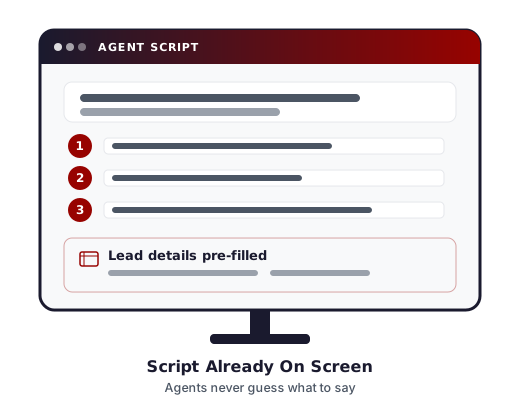
Call center scripting that's built into your agents' dialing screen — included on every plan from $250/mo, with no per-seat scripting fee, ever.
Most call center software treats scripting as an afterthought: a plain-text box agents scroll past, or a separate module you pay extra to unlock. Here, scripting is built into the same screen your agents already work from — dialing, dispositioning, and reading their script in one place — and it's included on every plan at no added per-seat cost. Your agents stay focused. Your compliance language gets read. And you're not paying extra for the privilege.
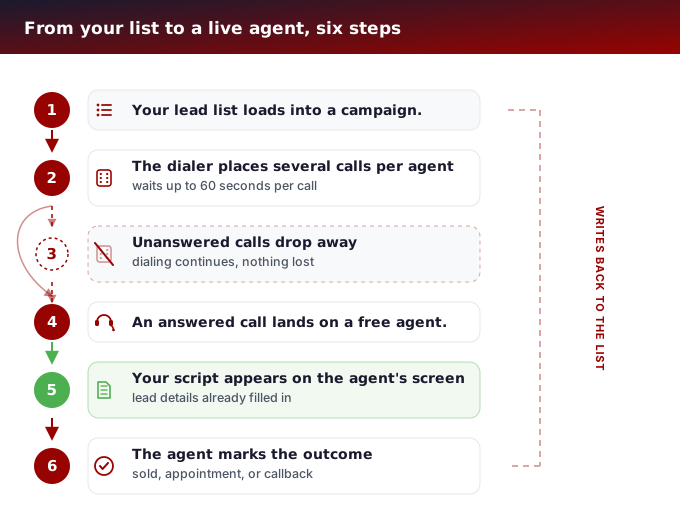
How much does call center scripting software cost?
Call center scripting is included on every hosted plan here at no extra per-seat fee — it isn't a separate product or an add-on tier. Plans start at $250/mo for 10 reps and 50 channels, the same rate card used across the platform, with a one-time $499 setup fee that includes 3 hours of support.
That matters because a lot of per-agent call center platforms price scripting as a premium feature: you either need a higher-priced plan tier to unlock it, or you pay per agent, per month, on top of your base seat cost, just to give agents a script instead of a blank screen. Here, it's part of what $250/mo already buys — whether you run 10 reps or 50.
| Plan | Reps / Channels | Monthly |
|---|---|---|
| Starter | 10 reps / 50 channels | $250 |
| Professional | 25 reps / 125 channels | $550 |
| Enterprise | 50 reps / 250 channels | $1,050 |
See the full rate card, per-rep pricing, and what every plan includes on our call center dialer page. Questions? Call us at 866-273-4639 — we're happy to walk you through what's included.
What other businesses say about eTollfree scripting
Real feedback from US-based call center operators using the platform today.
"We were paying an add-on fee just to give agents a script on our old platform. Switching to eTollfree cut that line item completely — scripting just works, it's right there on the same screen, and our compliance team finally stopped worrying about agents ad-libbing the disclosure language."
Call Center Operations Manager, Insurance Services — Ohio
"The list-level script override was the feature that sold us. We run cold outreach and warm re-engagement lists side by side, and having each list pull its own script — without splitting into separate campaigns — keeps our reporting clean and our agents consistent."
Director of Sales Operations, Home Services — Texas
"Setup was straightforward. We handed eTollfree our existing Word doc scripts and the support team had them mapped to our campaigns and inbound queues inside the first session. New agents ramp faster because they're never guessing what to say next."
Contact Center Supervisor, Financial Services — Florida
Ready to see it for yourself? Call 866-273-4639 — we'll walk you through a live demo at no obligation.
What is call center scripting software?
Call center scripting software gives your agents a written script to read from while they're on a call — talking points, disclosures, or a full call flow — displayed right inside the same screen they're already dialing and dispositioning from. Done well, it keeps agents consistent on compliance-sensitive language without making every call sound robotic.
Think of it as the difference between handing a new hire a script the first week and expecting them to memorize your entire pitch, versus giving every agent — new or veteran — a live, structured guide that adjusts to the campaign, the lead list, and even the lead's own information as the call happens. A required disclosure doesn't get skipped because an agent forgot it; a new agent doesn't go off-script on a compliance-sensitive line; and a seasoned agent isn't stuck reading a rigid script they've outgrown, because scripts here can flex by group, list, and campaign instead of being one fixed block of text for everyone.
Do I pay extra per agent for scripting?
No. Scripting is included in the $250/mo base plan, same as every other tier — there is no per-seat scripting fee. That's the honest differentiator against per-agent platforms that gate scripting behind a higher-priced tier or bill it as an add-on module per login. You pay for reps and channels; scripting comes with the platform.
Can I run more than one script on the same campaign?
Yes — each campaign supports a primary script and an optional second script, which can be turned on when you need it. That's useful for A/B-ing talking points across a campaign manually, running a shorter script for warm leads and a longer one for cold leads, or keeping a backup script ready for a promotion that's about to end.
Say you're running a renewal campaign where most of the list is straightforward, but a segment of leads has a past billing issue that needs a different opening line before the agent gets into the standard pitch. Rather than writing one script that tries to cover every scenario with conditional notes an agent has to interpret on the fly, you write two clean scripts and toggle the second one on for the campaign whenever it's needed.
Can different lead lists inside one campaign use different scripts?
Yes. Scripts can be overridden at the list level, so two lead lists running inside the same campaign can show agents two different scripts — without splitting them into separate campaigns. That matters if you're dialing, say, a fresh list and a re-engagement list side by side and want different framing for each.
This is a level deeper than the two-scripts-per-campaign toggle above: instead of switching a whole campaign between script A and script B, a specific list inside that campaign can be pinned to its own script permanently. A cold-outreach list and a warm referral list dialing under the same campaign, same agents, same reporting — but each list's calls open with the script written for that lead source.
Can inbound calls use scripts too, or is scripting outbound-only?
Scripting isn't limited to outbound dialing. Inbound call queues have their own script configuration, so an agent answering an inbound call sees a script suited to that queue — separate from whatever script outbound campaigns are running. That's a meaningful distinction if you're comparing platforms: some call center software treats scripting as an outbound-only feature, leaving inbound agents to wing it or work from a printed cheat sheet taped to their monitor.
If your team runs a support line and a sales line into the same seats, each inbound queue can carry its own script — a support queue answer flow separate from a sales queue answer flow — so agents aren't relying on memory to know which mode they're in.
Can I assign a different script to a specific agent group?
Yes. Scripts can be tied to a specific agent group, so a campaign can run one script for a newer group of agents and a different one for a more experienced group, without agents in one group ever seeing the other group's script.
This is useful during onboarding: put new hires in their own agent group with a more detailed, step-by-step script while they're ramping up, and keep your tenured agents in a separate group with a leaner script that assumes they already know the product. Both groups can dial the exact same campaign and list at the same time — the script is what differs, not the campaign setup.
Is there a separate script for quality control or call review?
Yes — campaigns support a separate QC script, distinct from the agent-facing script, for use during quality-control or verification review of a call. That keeps your compliance/QC workflow on its own script rather than repurposing the sales script an agent already used.
A QC reviewer confirming consent, verifying details, or re-reading a required disclosure back to the customer is a different conversation from the original sales or service call — it has its own required language and its own checklist. Giving it a dedicated script means your QC team isn't scrolling through an agent's sales script hunting for what they need, or improvising the verification language call to call.
Do scripts pull in the caller's own information automatically?
Scripts are built in HTML and can substitute in a lead's own field data as the agent reads from it — so instead of an agent manually reading a name or account number off a separate screen, the script itself can display the lead's information inline as part of the flow. A greeting line can render with the lead's actual first name already in place, or an account confirmation step can pull in the specific number on file for that lead, all inside the same script text the agent is reading.
That's a small detail with a real effect on call quality: agents don't have to break their rhythm to go find a piece of information on another part of the screen, and the information that does get read back to the customer is pulled straight from the lead record instead of retyped or misread by hand.
Where do agents actually see the script during a call?
The script renders inside the agent's own screen as an embedded tab — not a separate popup window or a second application to switch between. Agents work from one interface: dial, see the script, disposition the call. There's no alt-tabbing to a shared doc, no separate script viewer app to keep open, and nothing for an agent to lose track of mid-call.
What isn't included?
To be direct about where the line is: this is not a drag-and-drop visual script builder, it does not generate scripts with AI, and it does not run A/B testing on script variants for you. If your team is looking for a click-and-drag flow designer, an AI tool that writes your call scripts for you, or built-in split-testing between script versions with automatic winner selection, this isn't that product.
What you get instead is real, flexible scripting — per-campaign, per-list, per-agent-group, inbound and outbound, plus a separate QC script, HTML formatting, and automatic lead-field substitution — built and maintained the way your team needs it, included at no extra per-seat cost. Scripts are written and edited by your team (or ours, as part of setup) rather than generated automatically, which for regulated or compliance-sensitive campaigns is often the safer approach anyway: every line in the script is one your team wrote and approved, not one a model produced on the fly.
Is there a contract, or can I try it month-to-month?
No contract. Every plan, scripting included, is month-to-month — cancel anytime, move between rep bands anytime, no penalty either way. The one-time cost is the $499 setup fee, which includes 3 hours of support to get your campaigns, lists and scripts configured.
That first setup window is typically where scripts get built: converting your existing sales script, disclosure language, or QC checklist into the campaign, list, group, and inbound-queue scripts described above. If you already have scripts written in a document or spreadsheet, most of that setup time goes into mapping them onto the right campaigns and lists rather than writing new content from scratch.
What does the full platform cost, beyond scripting?
Scripting is one piece of the same rate card that covers the whole platform: $250/mo for 10 reps and 50 channels, scaling $20/mo per additional rep, with fully managed hosting, 24/7 support, unlimited inbound and outbound campaigns, call recording with 12-month storage, real-time reporting, and STIR/SHAKEN compliance included on every tier. Calling minutes (from 1.5¢/min US-48) and phone numbers (30¢/mo per local number) bill separately on usage.
Because scripting rides along on the same plan rather than sitting on its own pricing tier, growing your team doesn't change how scripting is billed — call 866-273-4639 if you'd like to talk through the full platform or get a quote sized to your team.